How to Build SEO Tools with AI: From 0 to 30 Visitors in Two Weeks
·7 min read
Saturday morning I opened the dashboard and saw 30 sessions. From nine different countries — United States, France, Poland, India, South Korea, Brazil, Canada, Germany, Ireland. Two weeks earlier the same dashboard showed zero. Real visitors, real countries, real traffic on a site I built from my couch.
It feels impossible until it doesn't. That's the part nobody tells you about driving your first users — you spend months thinking it's a problem only people with budgets and growth teams can solve, and then one Sunday morning your laptop tells you nine countries showed up while you were asleep. Thirty isn't a victory lap. Thirty is proof of life — proof that the traffic machine you built actually works. Proof that you, alone, on a Tuesday night with a laptop and a YAML config, can put something on the public internet that strangers in Seoul and Warsaw will read.
This post is about that machine. I built it as a separate kit called Highway, then dogfooded it on a different product I ship — Liftkit, an AI product-building framework. The dashboard above is Liftkit's. The kit producing the posts that drove those 30 sessions is Highway. Same person, two products, one feedback loop.
What 30 sessions actually look like
Sessions Apr 25 → May 8 2026, source: Looker Studio dashboard.
- 30 sessions total over 14 days
- 9 countries of origin: US (8), France (6), Poland (6), India (2), South Korea (2), Brazil (1), Canada (1), Germany (1), Ireland (1)
- 0 CTA clicks in the same window
- 0 purchases
- 4 published blog posts, 2 of them generated by Highway skills
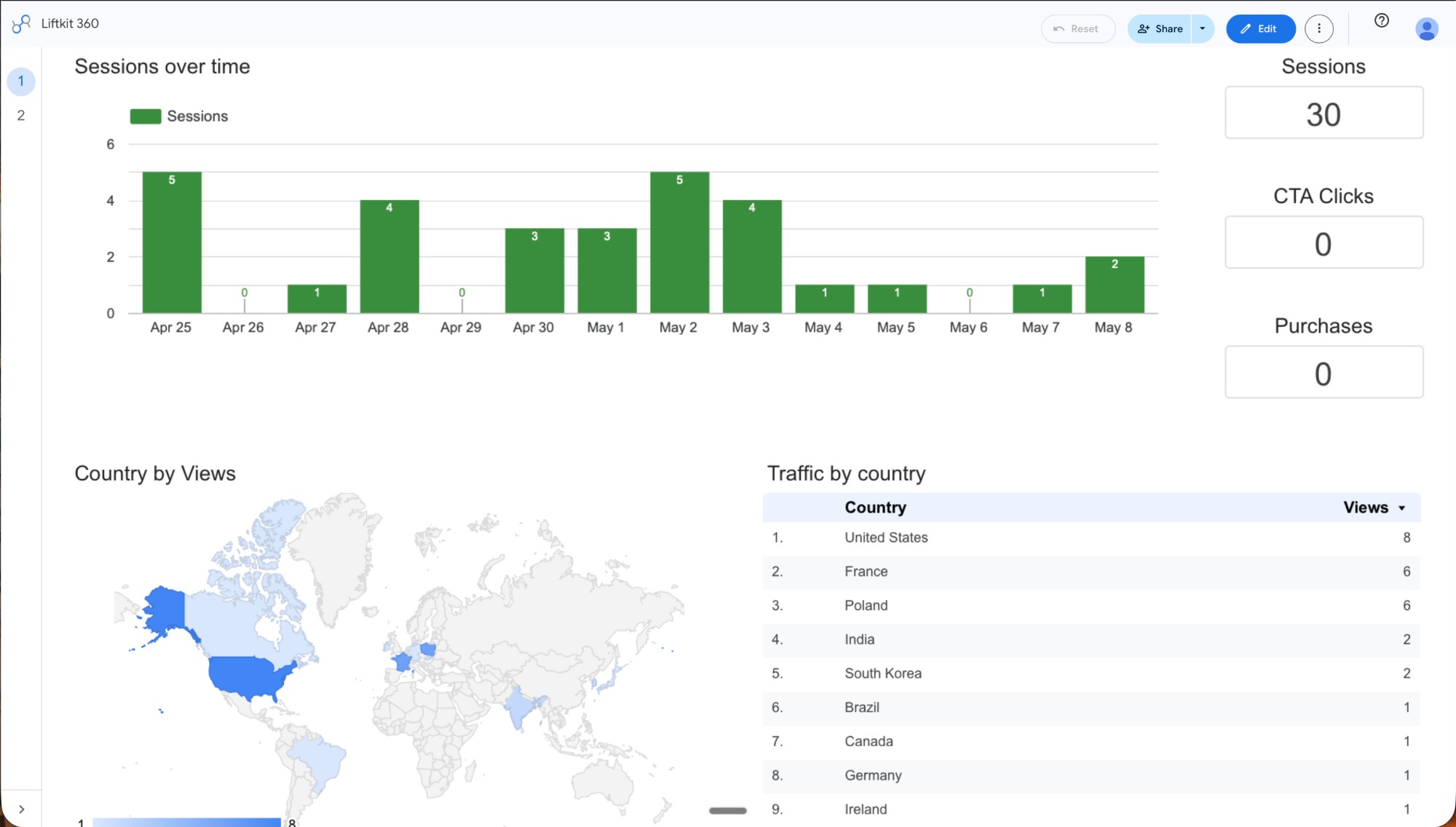
That last set of numbers is the honest part. Traffic showed up. Conversion did not. Yet. The next 90 days are the learning agenda — picking which audience converts, which CTA copy lifts, which post topics carry intent. Highway's whole point is that the agenda runs on real numbers from real APIs, not vibes. Looker Studio shows you what happened. Highway tells you what to do about it.
How I built it
Here is the architecture I converged on after one weekend of trial-and-error. If you want to build SEO tools with AI for your own product — that you can run from your home, on a laptop, in evenings — the seven steps are:
1. Map the AARRR funnel before writing a single skill. Acquisition, Activation, Retention, Referral, Revenue. Each layer needs one tool that outputs one thing. If you can't say what each tool outputs, you'll build a chatbot, not a system.
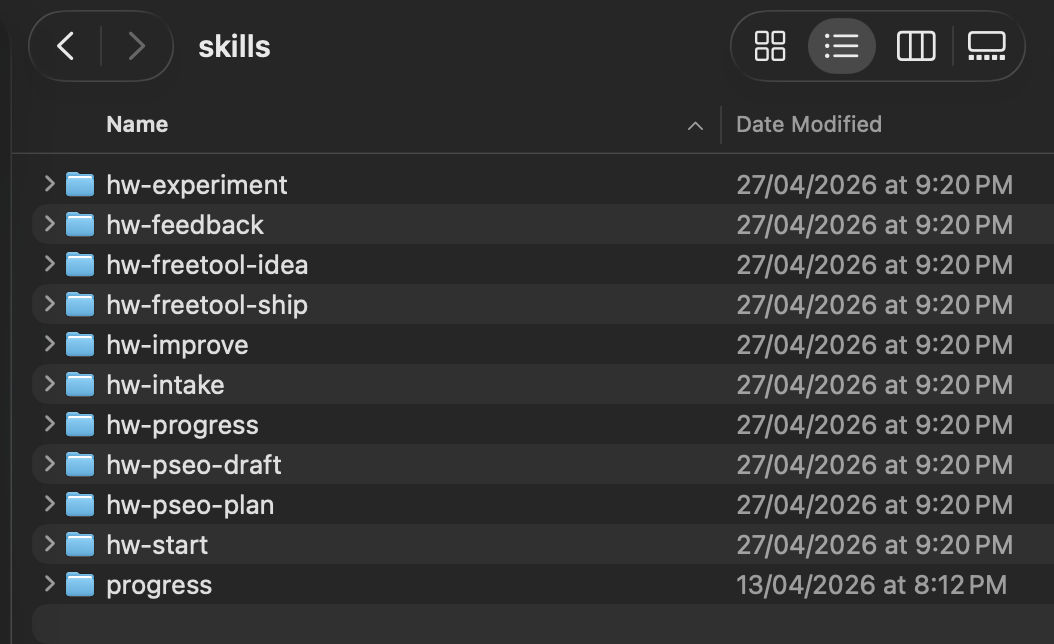
2. Define each tool as one Claude Code skill with one job. Highway has 10 skills:
hw-intake— Porter 3F gate decision before any content work startshw-pseo-plan— RICE-rank 10-15 keyword opportunitieshw-pseo-draft— produce ONE article from ONE briefhw-freetool-idea— rank 5 free-tool ideas by fit/efforthw-freetool-ship— turn one idea into a buildable spechw-experiment— design ONE A/B test with computed sample sizehw-progress— the AARRR dashboard pulled live from real APIshw-feedback,hw-improve,hw-start— workflow glue
Each skill has a single SKILL.md with a fixed structure: Role, Input, Process, Output, Next action, Guard rails. No skill produces more than one thing per run.
3. Make every output a typed schema. Zod schemas (PseoPlanSchema, PseoDraftSchema, ProgressSchema). The skill builds the object, parses it against the schema, and refuses to render or persist if validation fails. Deterministic math + enforced shape = an AI tool you can actually trust with publishing decisions. The LLM only fills in the prose between rigid scaffolding.
4. Source every number — never let the AI estimate. Each metric carries a source field: ga4 | gsc | posthog | snapshot. If the live API is down, fall back to the latest snapshot. If there's no snapshot, return zero with source: snapshot and flag the module red. The AI never invents a number to fill the box. The 30 sessions above are sourced from Looker Studio, not vibes.
5. Hard-code the "next action" decision tree. /hw-progress applies seven rules in order and stops at the first match — red module, then stale cadence, then idle module, then unpublished drafts, etc. The tool tells you one next move, not five options. That's the difference between a dashboard you read and a tool you obey.
6. Wire skills together with anti-cannibalization gates. /hw-pseo-plan checks the existing brief directory and refuses to propose keywords that overlap with briefs already on disk. /hw-pseo-draft refuses to run without a brief. The pipeline only flows in one direction.
7. Dogfood on your own product first. Before I sell the next version of Highway, every skill has to prove itself by shipping someone else's traffic. Liftkit is that someone else. Those 30 sessions are Highway grading itself in public. If a skill never works on a product its author actually ships, it's not a tool — it's a vendor pitch.
What broke (and how I fixed it)
The first version of /hw-progress would have crashed if either Google API was offline. I'd written it to pull live GA4 + GSC on every run. Earlier this week I ran /hw-progress to check what I'd shipped Saturday and got a wall of invalid_grant from the OAuth refresh token — Google had silently rotated it after a long enough idle window. The dashboard was useless. I had no idea what was happening on the site I'd just relaunched, on the morning I'd planned to write about it.
I caught it before publishing the broken version because of one design decision I'd made the day before: every metric in the schema has a source field with snapshot as a fallback. I'd written that fallback expecting weekend rate-limits or transient outages — not full credential expiration. But because it was already wired, the fix took twenty minutes: point /hw-progress at the snapshot directory, render zeros with source: snapshot, flag the affected module red, surface the OAuth refresh as the diagnostic next-action.
Now the dashboard works in three failure modes I didn't anticipate when I designed it: (a) network down, (b) credentials expired, (c) GSC has zero data because the domain is too new. All three render the same shape — sourced metrics, snapshot fallback, a deterministic next-action telling you exactly what to fix.
The lesson generalizes. If you're going to ship a tool you'll trust with real publishing decisions, build the failure mode in first, not after the first crash. A working tool that handles its own credential rot is worth more than a brilliant tool that needs babysitting.
The takeaway
You can drive your first 30 visitors from your couch with a kit you built yourself. You can't sleep through the next 9,970. The first leap — 0 to 30 — is proof the system works. Every leap after that is a learning agenda, run on sourced numbers from real APIs, one experiment at a time.
The 30 sessions on my dashboard came with 0 CTA clicks. That's not a failure — it's the start of the next chapter. Highway's /hw-experiment skill produces one A/B test design at a time with a computed sample size and a stopping rule, so I can stop guessing why nine countries showed up but nobody clicked the offer. With 30 sessions a week, the experiments will take time. They'll happen. That's how you get from a couch to ten thousand.
See Liftkit — the framework Highway runs on
Highway runs on Liftkit. Liftkit ships Highway-generated traffic. Same person, two products, one feedback loop.
Keep reading
The Claude Code Template I Used to Ship a Real Site as a Solopreneur (in 3 Hours)
The first deploy worked. That was the part I didn't expect. I'm a solopreneur with a 9-5. I spent years at Rappi (one of Latin America's two unicorns at the time), then moved to Addi (a Colombian fintech, close to unicorn now).
7 min read
What's Actually Inside the Claude Code Starter Pack I Used to Ship Liftkit
Most "Claude Code starter pack" downloads I've opened in 2026 are a folder of generic prompts you could've written yourself in five minutes. They sell vibes, not structure. The starter pack I used to…
7 min read